Keyboard Layout
Krutidev Marathi Keyboard
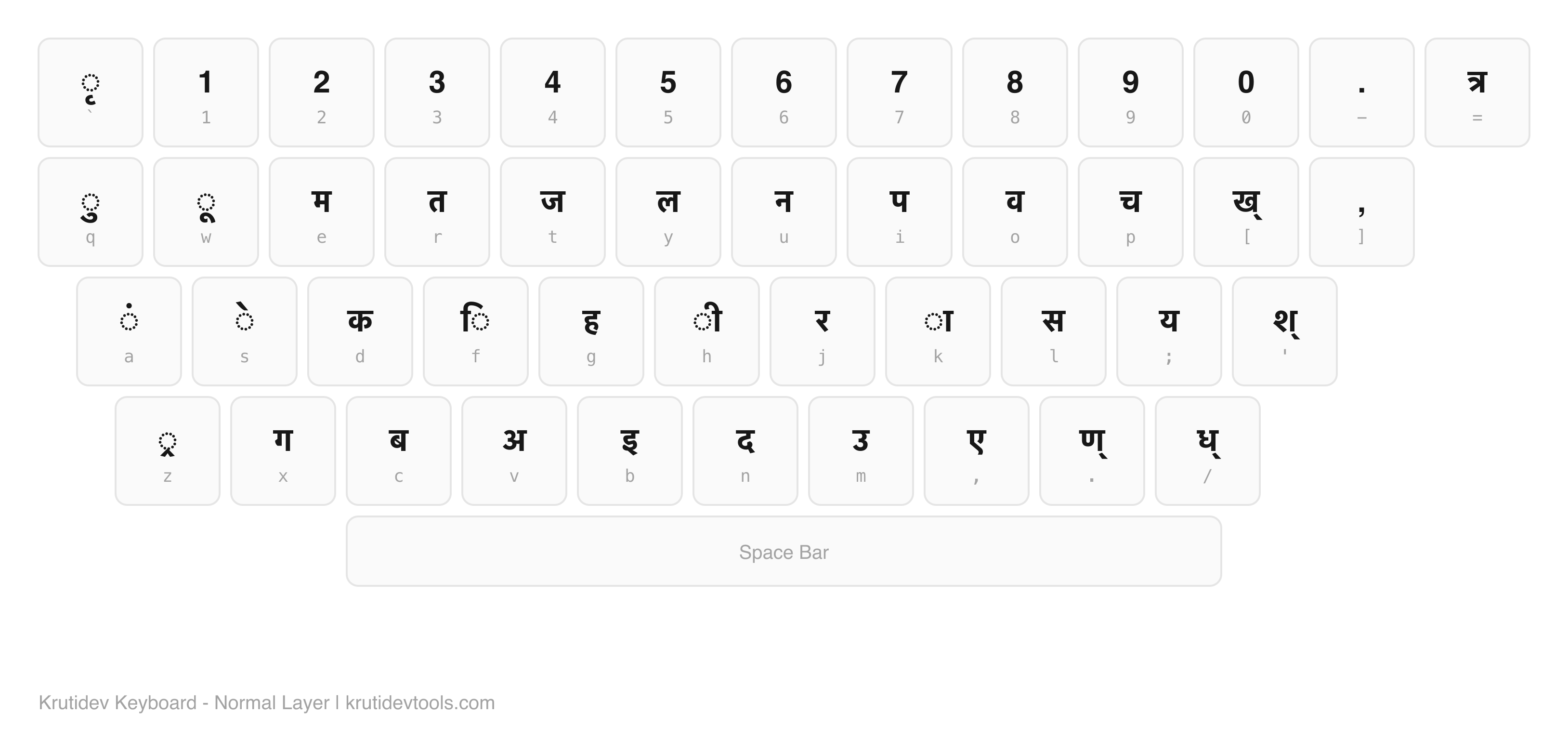
The Krutidev keyboard for Marathi uses the same Remington layout as Hindi. This page highlights the Marathi-specific characters and their keys.
Marathi-Specific Characters
These characters are used more frequently in Marathi than in Hindi. The keyboard layout is identical - these are just the keys Marathi typists need most.
| Character | Name | Key | Note |
|---|---|---|---|
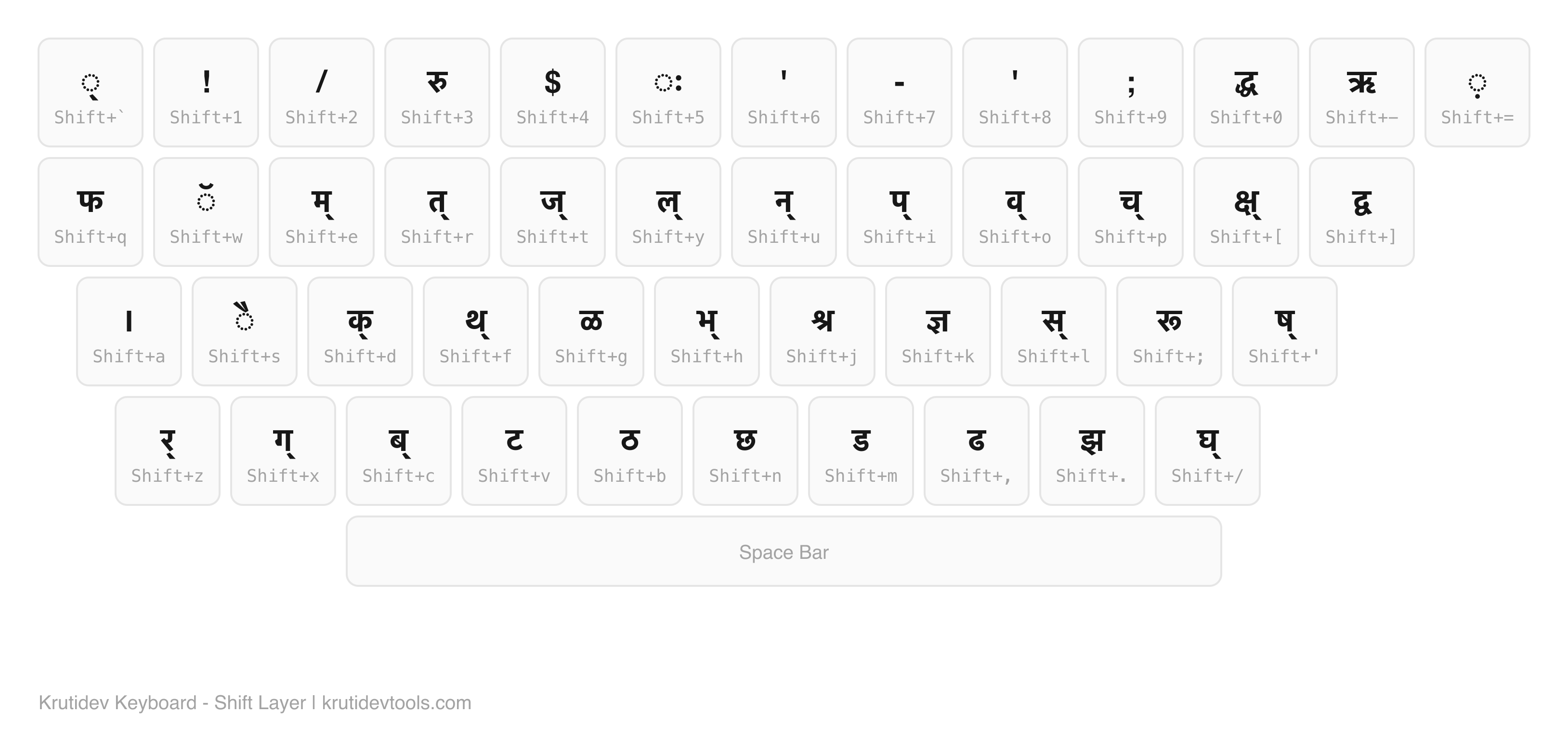
| ळ | La (retroflex) | Shift+g (G) | Common in Marathi, rare in Hindi |
| ण | Na (retroflex) | . + k | Used more frequently in Marathi |
| ऱ | Ra with nukta | Special | Marathi-specific sound |
| श | Sha | ' + k | Same key as Hindi |
| ष | Sha (cerebral) | " + k | Same key as Hindi |
| ज्ञ | Dnya | Shift+k (K) | Pronounced differently in Marathi (dnya vs gya) |
| च | Cha | p | Marathi uses both च and छ frequently |
| ं | Anusvara | a | Used heavily in Marathi conjuncts |
| ॲ | Chandra A | Alt+0972 | Marathi-only vowel for English "a" sound as in "cat" |
| ऑ | Chandra O | Alt+0911 | English "o" sound as in "hot" - more common in Marathi than Hindi |
Krutidev Layout (Remington) for Marathi
This is the same Krutidev/Remington layout used for Hindi. All characters work for Marathi. The ळ key (Shift+g) is highlighted in the Shift layer.
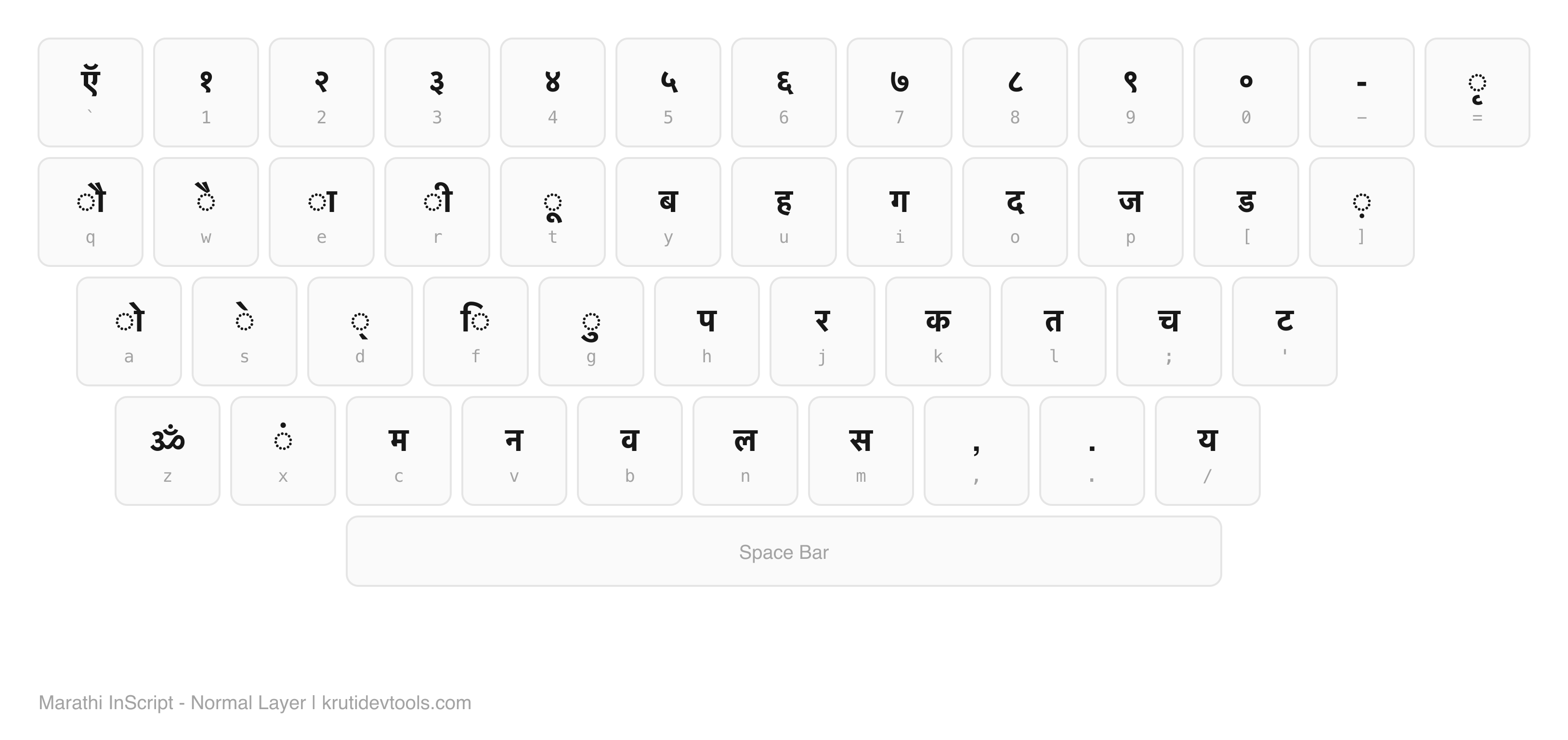
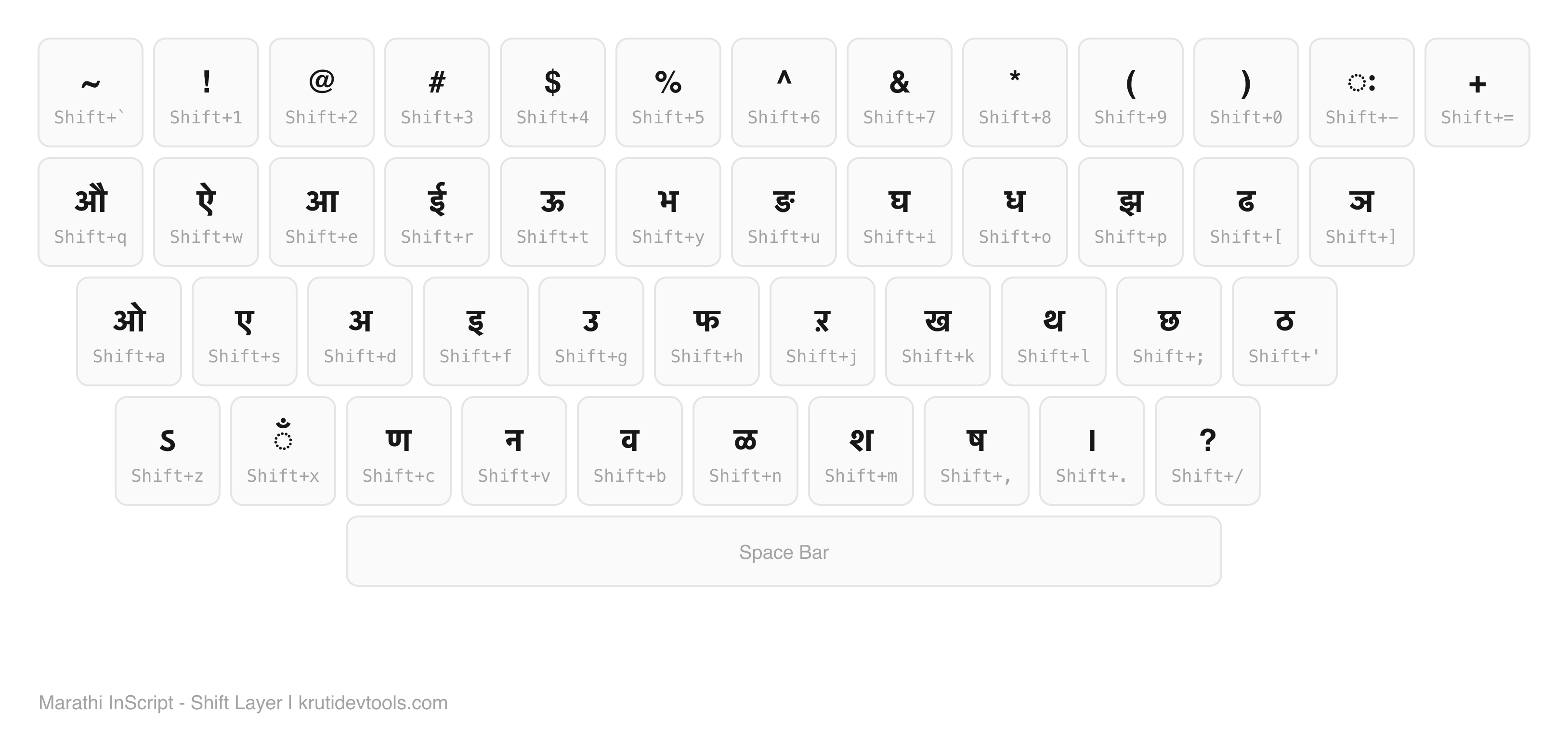
Marathi InScript Layout (MSCIT Exams)
The official Windows Marathi keyboard (KBDINMAR). Different from Hindi InScript - has ऍ on backtick, ॐ on Z, and ळ on Shift+N. Used in MSCIT and Maharashtra government exams.
Marathi Typing Shortcut Keys - Full List
Every consonant, vowel and matra a Marathi typist needs, with its Kruti Dev 010 key. Marathi and Hindi share this list in full, so nothing here is missing for Marathi text.
Consonants (व्यंजन)
| Character | Name | Key |
|---|---|---|
| क | Ka | d |
| ख | Kha | [ + k |
| ग | Ga | x |
| घ | Gha | ? + k |
| ङ | Nga | special |
| च | Cha | p |
| छ | Chha | Shift+n |
| ज | Ja | t |
| झ | Jha | Shift+. |
| ञ | Nya | special |
| ट | Ta | Shift+v |
| ठ | Tha | Shift+b |
| ड | Da | Shift+m |
| ढ | Dha | Shift+, |
| ण | Na | . + k |
| त | Ta | r |
| थ | Tha | Shift+f + k |
| द | Da | n |
| ध | Dha | / + k |
| न | Na | u |
| प | Pa | i |
| फ | Pha | Shift+q |
| ब | Ba | c |
| भ | Bha | Shift+h + k |
| म | Ma | e |
| य | Ya | ; |
| र | Ra | j |
| ल | La | y |
| व | Va | o |
| श | Sha | ' + k |
| ष | Sha | " + k |
| स | Sa | l |
| ह | Ha | g |
Vowels (स्वर)
| अ | A | v |
| आ | Aa | v + k |
| इ | I | b |
| ई | Ii | b + Shift+z |
| उ | U | m |
| ऊ | Uu | special |
| ए | E | , |
| ऐ | Ai | , + s |
| ओ | O | v + k + s |
| औ | Au | v + k + Shift+s |
| ऋ | Ri | Shift+- |
Matras (मात्रा)
| ा | Aa matra | k |
| ि | I matra (placed before consonant) | f |
| ी | Ii matra | h |
| ु | U matra | q |
| ू | Uu matra | w |
| ृ | Ri matra | ` |
| े | E matra | s |
| ै | Ai matra | Shift+s |
| ो | O matra | k + s |
| ौ | Au matra | k + Shift+s |
| ं | Anusvara (bindu) | a |
| ँ | Chandrabindu | special |
| ः | Visarga | Shift+5 |
| ् | Halant (virama) | Shift+` |
Print or Save the Marathi Chart as PDF
Press Ctrl+P (Cmd+P on Mac) and set the destination to "Save as PDF". The tables above are plain HTML, so they reflow to A4 or Letter without the characters breaking apart, and the Devanagari stays selectable text in the saved file rather than becoming a flat image.
Two settings matter. Turn Background graphics on, otherwise the row separators disappear and the key column becomes hard to scan. Set Scale to around 80% to fit the consonant table on one page instead of splitting it across two.
If you want the Remington layout itself rather than the shortcut tables, the Krutidev keyboard PDF is already laid out for a single sheet, and the HD keyboard images download as PNG files you can drop into a document or print large for a wall.
Marathi vs Hindi Typing Differences
The Krutidev keyboard is the same for Hindi and Marathi. Both languages use Devanagari script, and the Remington layout covers all shared characters. The practical differences come down to frequency of use:
- ळ (La retroflex): Marathi uses this constantly. Hindi almost never does. A Marathi typist needs to know the Shift+g shortcut by muscle memory.
- ण (Na retroflex): Marathi has more words with ण than Hindi. The .+k shortcut gets more use.
- ज्ञ pronunciation: Same character, different sound. Marathi says "dnya", Hindi says "gya". Typing is identical.
- Anusvara usage: Marathi uses anusvara (ं) in places where Hindi uses the full nasal consonant. More "a" key presses in Marathi typing.
Related Pages
Marathi Typing Resources
Marathi uses the same Kruti Dev encoding as Hindi, with a handful of extra characters. These pages cover practice, fonts and conversion for Marathi specifically.
- Marathi Typing Test - timed Marathi passages for MSCIT and Maharashtra state exams.
- Marathi Font Download - the Krutidev file that covers both Hindi and Marathi characters.
- Full Krutidev Keyboard Chart - the complete character map this Marathi chart is derived from.
- Krutidev to Unicode Converter - turn Marathi typed in Kruti Dev into shareable Unicode.
- Unicode to Krutidev Converter - paste Marathi from the web into a Kruti Dev document.
- All Shortcut Keys - the searchable list behind every key shown on this chart.